
Time-Saver for TM Connect in Outlook
Date: May. 10, 2012 Categories: email , links
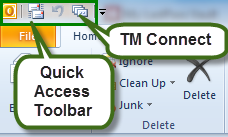
TM Connect saves an Outlook e-mail message as a TM email record you can link to a Contact and a Matter. It is a great tool for putting your e-mails on the email tab of a Matter so that all the Matter information -- documents, people, phone calls and more -- are together on the Matter record.
But in Outlook 2010, the button is in Outlook's Add-Ins menu. You can make a TM button visible in Outlook 2010.
To add TM Connect to the Outlook Quick Access Toolbar:
- Click on the Add-Ins menu in Outlook 2010.
- Right-click on the TM Connect icon
- Choose Add Group to Quick Access Toolbar (QAT)
For us hotkey junkies, there is an even neater trick once you've added TM Connect to the QAT.
- Press Alt-4 Tab Enter
Presto, the TM email form appears. Alt-4 works if the TM icon is 4th in the QAT. If it is 5th or 6th, use Alt-5 or 6 or whatever.
In an Outlook e-mail, you can also add TM Connect to the Quick Access Toolbar by right-clicking it. Now Alt-6 (if the TM Connect button is 6th in the e-mail's QAT) brings up the TM email form directly. A tip of the hat to David Ransin (www.ransin.com) for this tip.