
Reuse and Reorder Text in emails and Documents
Date: Oct. 13, 2022 Categories: document creation , email , Windows
Don’t keep retyping the same things again and again. A free feature in Microsoft Windows avoids repetitive typing so you get work done faster.
Microsoft Windows has a Clipboard history feature you can use to temporarily save multiple selections of words and phrases for fast relocation or reuse.
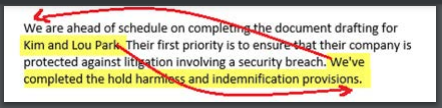
Let’s say you’ve written a paragraph and want to reorder parts of it like this:
Using Windows Clipboard history, you could first select:
Kim and Lou Park
Cut the text using either Right-Click , Copy, or Ctrl key and X.
With their names still selected, you could overwrite the selection by typing: “them”.
Next, you could select and cut:
We’ve completed the hold harmless and indemnification provisions.
Now you have these two text snippets saved in the Clipboard history.
By pressing Windows Key and V , you can display the contents of the Clipboard history.
To paste a snippet from the Clipboard history:
-
Put the cursor where you want to insert the text.
-
Press Windows Key and V to bring up the Clipboard history
-
Click on the text you want
-
Press Enter
The Clipboard history feature is also useful for pasting the same names or phrases repeatedly into a document as you compose. Select and copy the text once. Use it in multiple places.
Features of Windows Clipboard History
-
Save up to 25 text snippets.
-
Restarting the computer clears the contents.
-
Pin an item using the three dots next to it to retain it after a restart.
-
Manually clear all items by clicking the three dots and choosing Clear All.
-
Works to copy text between any Windows in Microsoft Windows.