
Shortcut for Time Matters Classification Codes
Date: Apr. 16, 2018 Categories: forms , organizing
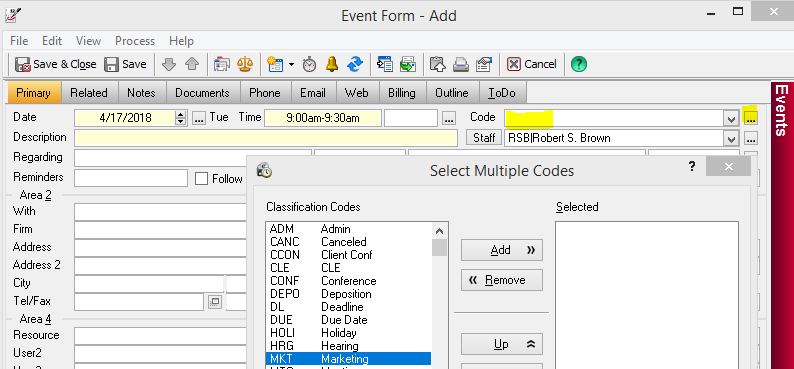
Choosing a Classification Code for each Time Matters record helps you organize and quickly access all manner of Time Matters records.
Coding Documents can be particularly challenging because the number of Classification Codes could increase endlessly. Beyond the obvious codes for Correspondence, Agreements, Research, Memos, and Pleadings, you may need to code Meeting Notes, Agendas, Deposition Summaries, Plans, and on and on.
As your number of Classification Codes grows, so does the importance of being able to select one quickly from a long list. Here is a shortcut.
The quickest way to select a Classification Code for a record is to know it by heart and type it in. Consistently using the first four letters of the document type, when possible, can help a lot.
But let's say you only remember the code vaguely and know the first letter.
- Click in the Code field and press the F2 key.
or Click the [...] button right after the Code field. - Type the first letter, "M" in the example, below.
The cursor will find the first Code that starts with that letter. Use the Down Arrow key or mouse to pick the Code you want.
- Click OK , or press Alt-O.
Exit the Code field by pressing the Tab key or clicking the mouse where you want to go.