
Abbreviations vs Descriptions in Reports
Date: Jun. 14, 2010 Categories: reports
A Time Matters Secret
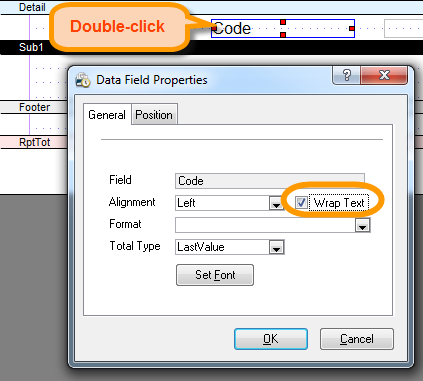
Hidden within the Report Designer of Time Matters is an undocumented feature for selecting whether to display an Abbreviation or a Description for some fields in Time Matters custom Reports. A tip of the hat to Neil Johnson and Jeff Krause for revealing this secret in their excellent Time Matters Bootcamps.
You can choose to display:
- The Code of a Classification Code instead of its Description, or
- The Initials of a Staff instead of the Staff Name
To do so, check the Wrap Text box in the Properties window for the field in Report Designer. You can only do this in Reports that you create, not the standard, pre-programmed reports.
Codes are 1 to 4 characters long, as are Staff Initials, so they make for narrower columns in the custom reports you create. That can be important when trying to fit a number of fields into one line per record in a report.
The Wrap Text checkbox works in the expected way on other kinds of fields, wrapping the text to two or more lines as needed to fit a long entry into a narrower column.
When you think about it, it makes sense to check Wrap Text to make a Classification Code or Staff entry narrower. These entries are not really wide enough to wrap well, but shortening them to a Code or to Initials accomplishes the same goal: making them fit into narrower columns.